Free gift · Prompt inside
How to makerealistic AI portraits?Free prompt inside
TL;DR
- A free gift: the method I use to write prompts for realistic AI portraits. 10 parts, each with what it does and the mistake that ruins it.
- The part that matters most is the skin. The “AI look” almost always starts there, and here you’ll see how to ask the model for the right flaws.
- Then a fill-in template and 3 full examples, very different from each other, ready to copy and paste.
To make realistic AI portraits you have to describe a real photograph, not a perfect person. That means skin with pores and small flaws, eyes with a catchlight, slightly messy hair, light that comes from one clear direction, a portrait lens and a list of things to avoid. The method below puts all of that into 10 parts, one for each choice.
Why AI portraits look fake
You spot them at first glance. The skin is smooth like plastic, the eyes are perfect and a bit empty, the light comes from nowhere. The face is beautiful, but it looks like a mannequin.
Unless you ask for something else, the model leans towards the cleanest, most symmetrical version of a face. A real photo is full of small flaws. To get a believable portrait you have to ask for those flaws, one by one.
That’s why the prompt is split into parts. Each one controls a single thing, so when a result doesn’t convince you, you know where to look.
How to build the prompt, part by part
The prompt is written in English, the language image models understand best. The parts follow the order of a real photo shoot:
For each part you get the piece of the base prompt (a close-up of a 19 year old blonde woman with blue eyes), what it does and the most common mistake.
1. Subject and framing
Close-up portrait of a beautiful 19 year old woman, long strong blonde hair, luminous blue eyes, tight head-and-shoulders framingIt says who the person is and how tight the framing is. The more precise it is (age, features, hair, eyes), the less the model makes things up. It’s the part you’ll change most from one generation to the next. Typical mistake: writing only “a beautiful woman”. The model fills the gap with an average, advertising face. Write the age as a number.
2. Skin
natural skin with visible pores, faint peach fuzz, subtle freckles, slight redness on the nose and cheeks, uneven skin tone, no retouchingThis is the most important part. The “AI look” almost always comes from skin that’s too smooth. Asking for imperfections makes it believable. Typical mistake: words like “perfect skin” or “flawless”, which lead straight to plastic. Watch the opposite too: keep the flaws small and “subtle”, not heavily marked skin if the subject isn’t like that.
3. Eyes
sharp detailed luminous blue iris, natural catchlight reflecting a window, slightly asymmetrical eyes, fine eyelashes, moist tear lineThe gaze is the first thing the human eye checks. The reflection of light in the eye and a slight asymmetry bring the face to life. Typical mistake: huge, identical eyes, the doll effect. The catchlight must come from the same light as part 6: here, a window.
4. Hair
long strong blonde hair with individual flyaway hairs, natural strands, uneven texture, a few loose hairs across the foreheadPerfect hair looks fake. Messy, flyaway hair looks real. Typical mistake: “perfect shiny hair”, which gives you a glossy helmet. A few hairs out of place are enough.
5. Expression and pose
relaxed neutral expression, slight tension at the corner of the lips, looking just past the cameraA face in a perfect pose looks like a mannequin. An almost neutral expression, with a little tension, looks like a moment caught on camera. Typical mistake: “smiling at the camera”, the catalog smile. Looking just past the camera feels more natural.
6. Light
soft window light from the left, gentle shadow falloff on the right cheek, subtle fill from a white reflectorIt says where the light comes from and how the shadows fall. Real light has a direction and soft shadows, it’s never flat. Typical mistake: just “studio lighting”, which gives even light from every side. Keep direction and shadow consistent: light from the left, shadow on the right cheek.
7. Camera and lens
shot on an 85mm lens, f/2.0, shallow depth of field, ISO 200, medium format lookIt makes the model think of a real photograph rather than a drawing. The 85mm is the classic portrait lens: a blurred background and natural proportions on the face. Typical mistake: a very wide lens on a tight close-up, which stretches the nose and distorts the face.
8. Background and color
plain warm gray studio backdrop, natural color grading, true to life skin tonesA simple background avoids distractions. Natural colors avoid skin that’s too orange or too contrasty. Typical mistake: a busy background that pulls attention away from the face, or words like “vibrant” that oversaturate everything.
9. Finish
fine film grain, editorial portrait photography, high detailA little grain removes the overly clean digital look. The word “editorial” steers it towards the style of a magazine. Typical mistake: too much grain, or words like “ultra sharp” that make the skin look hard.
10. What to avoid
Avoid: plastic skin, airbrushed look, overly smooth, perfect symmetry, CGI, illustration, oversharpened, heavy makeup, text, watermarkIt lists the flaws you don’t want. Some models have a dedicated “negative prompt” field, with others you write it at the end of the text, like here. Typical mistake: an endless list. Keep only the flaws you actually see in your results.
The fill-in template and 3 examples
What you get
- a template you can fill in for any face
- 3 full prompts, ready to paste
- 10 parts you can change one at a time
What to keep in mind
- the faces are made up: don’t use them to imitate a real person
- if you portray someone real, ask for their permission
- when you publish, say the image was made with AI
Here’s the fill-in template. Replace the fields in square brackets and leave the rest as it is.
[Framing] portrait of a [age] year old [person], [features], [hair], [eye color] eyes. Natural skin with visible pores, [skin marks], subtle freckles, uneven skin tone, no retouching. Sharp detailed [eye color] iris, natural catchlight reflecting [light source], slightly asymmetrical eyes, fine eyelashes, moist tear line. [Hair] with individual flyaway hairs, natural strands, uneven texture. [Expression], [where the eyes look]. [Light] from the [side], gentle shadow falloff on the [opposite side] cheek, [fill light]. Shot on an [lens] lens, [aperture], [depth of field], ISO [ISO], [camera look]. Plain [backdrop color] studio backdrop, [color tone], true to life skin tones. Fine film grain, [photo style], high detail. Avoid: plastic skin, airbrushed look, overly smooth, perfect symmetry, CGI, illustration, oversharpened, heavy makeup, text, watermark.Example 1: close-up in window light
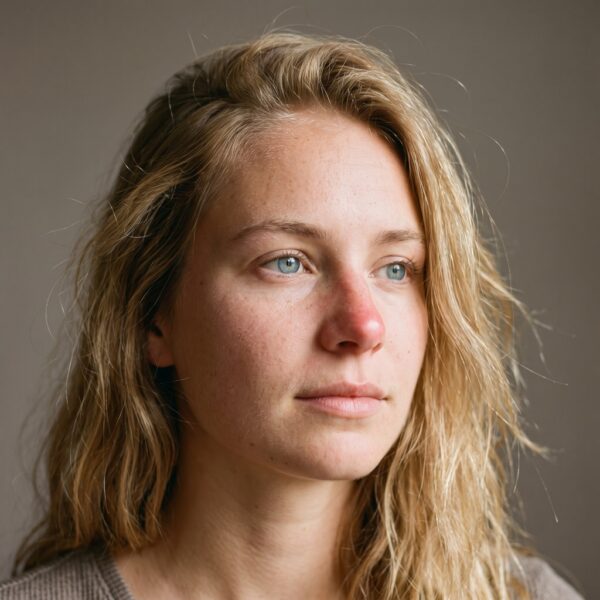
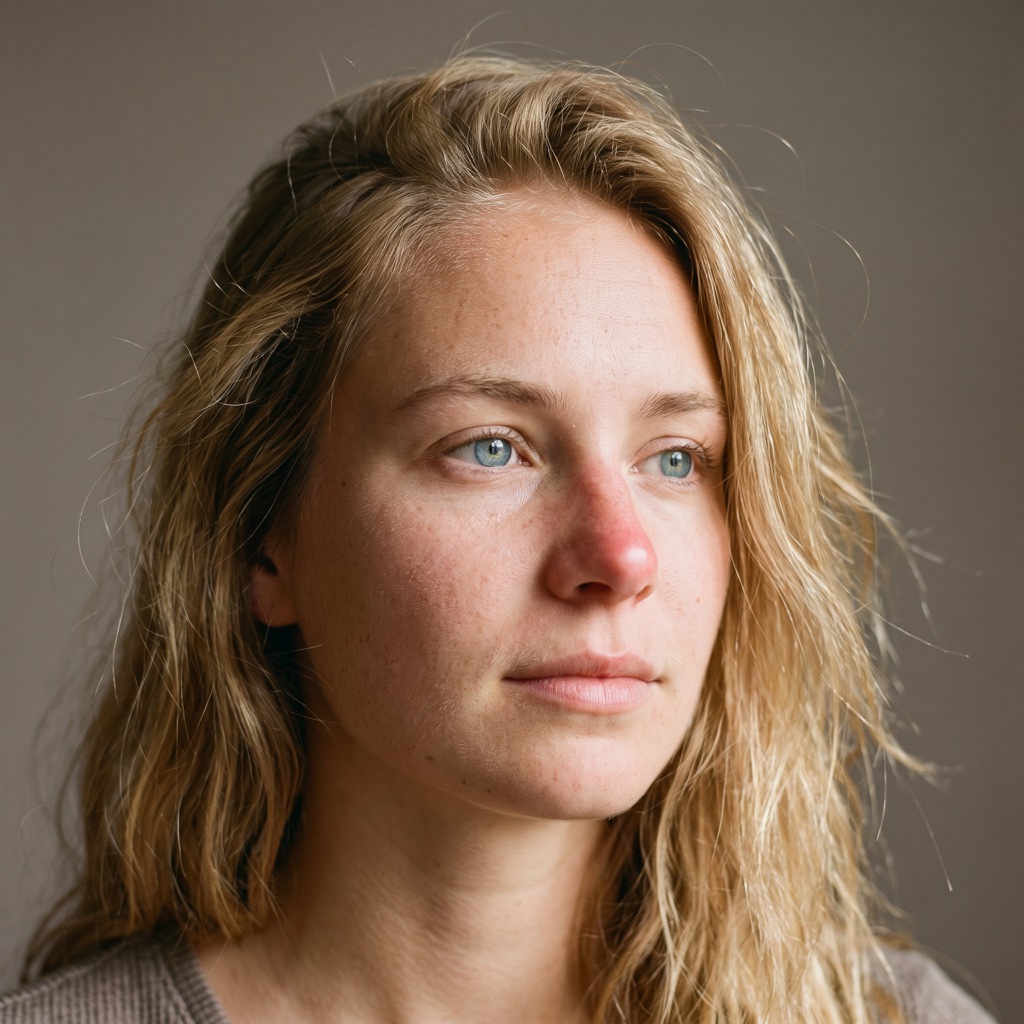
The base prompt: a 19 year old woman, soft light from the left, 85mm, warm gray studio backdrop. It’s the portrait you see at the top.
Close-up portrait of a beautiful 19 year old woman, long strong blonde hair, luminous blue eyes, tight head-and-shoulders framing. Natural skin with visible pores, faint peach fuzz, subtle freckles, slight redness on the nose and cheeks, uneven skin tone, no retouching. Sharp detailed luminous blue iris, natural catchlight reflecting a window, slightly asymmetrical eyes, fine eyelashes, moist tear line. Long strong blonde hair with individual flyaway hairs, natural strands, uneven texture, a few loose hairs across the forehead. Relaxed neutral expression, slight tension at the corner of the lips, looking just past the camera. Soft window light from the left, gentle shadow falloff on the right cheek, subtle fill from a white reflector. Shot on an 85mm lens, f/2.0, shallow depth of field, ISO 200, medium format look. Plain warm gray studio backdrop, natural color grading, true to life skin tones. Fine film grain, editorial portrait photography, high detail. Avoid: plastic skin, airbrushed look, overly smooth, perfect symmetry, CGI, illustration, oversharpened, heavy makeup, text, watermark.Example 2: direct flash on black
A 70 year old man, hard flash light, 50mm, black studio backdrop, high contrast. A tough, magazine-style portrait.
Close-up portrait of a 70 year old man, weathered face, short white beard, deep-set gray eyes, tight head-and-shoulders framing. Natural skin with visible pores, deep wrinkles on the forehead and around the eyes, sun spots, slight redness on the nose, uneven skin tone, no retouching. Sharp detailed gray iris, small hard catchlight from a flash, slightly asymmetrical eyes, fine eyelashes, moist tear line. Short white beard with individual stray hairs, uneven texture. Serious expression, slight squint, looking straight into the camera. Hard direct flash from just above the lens, crisp shadows under the nose and chin. Shot on a 50mm lens, f/5.6, ISO 100, 35mm film look. Plain black studio backdrop, high contrast, true to life skin tones. Fine film grain, editorial portrait photography, high detail. Avoid: plastic skin, airbrushed look, overly smooth, perfect symmetry, CGI, illustration, oversharpened, text, watermark.Example 3: warm Rembrandt light on a colored backdrop
A 28 year old man, warm light high from the side with a triangle of light on the shadow cheek, 105mm, deep teal backdrop. A gallery portrait.
Head-and-shoulders portrait of a 28 year old man, dark brown skin, short twisted hair, trimmed beard stubble, dark brown eyes. Natural skin with visible pores, a small scar on the eyebrow, slight shine on the forehead, uneven skin tone, no retouching. Sharp detailed brown iris, single warm catchlight from a softbox, slightly asymmetrical eyes, fine eyelashes, moist tear line. Short twisted hair with a few loose strands, natural texture. Calm confident expression, chin slightly down, looking straight into the camera. Warm key light from a softbox high on the right, Rembrandt triangle of light on the left cheek, deep soft shadows, no fill. Shot on a 105mm lens, f/4, shallow depth of field, ISO 100, medium format look. Plain deep teal painted studio backdrop, warm natural color grading, true to life skin tones. Fine film grain, fine art studio portrait photography, high detail. Avoid: plastic skin, airbrushed look, overly smooth, perfect symmetry, CGI, illustration, oversharpened, heavy makeup, text, watermark.How to use it: 5 tips
- Change one part at a time. If you change everything, you won’t know what made the difference.
- For a different face, change only part 1. The rest of the prompt keeps the same photographic style.
- For a different mood, change only part 6. For example hard flash light, or golden light at sunset. Examples 2 and 3 change exactly the light.
- If the skin still comes out too smooth, push part 2 harder. And add “macro skin texture”.
- Generate 4 images and pick the best one. Don’t stop at the first.
Frequently asked questions
Why do AI portraits look fake?
Mostly because the skin is too smooth, then because the eyes have no catchlight and the light is flat. In the prompt, part 2 asks for pores, freckles, redness and no retouching: it’s the part that makes the biggest difference.
Can I write the prompt in another language?
It’s best to keep it in English. The prompt is written in English and should be pasted as it is. The notes explain what each part does and which one to change.
How do I change the face without losing the style?
Change only part 1, subject and framing: age, features, hair, eyes. The other nine parts keep the skin, light, lens and finish the same.
Where does the "what to avoid" list go?
It depends on the model. Some have a dedicated field called “negative prompt”, and the list goes there. With the others you write it at the end of the text, as in the full prompts.
In short
An AI portrait looks fake when it’s too perfect. The 10-part prompt describes a real photo: skin with its flaws, eyes with life in them, messy hair, light with a direction and a portrait lens. Start from the template or one of the 3 examples, change one part at a time and pick the best of four results.
Need a face for your brand that stays the same in every scene?
At UAIT.AI we build virtual models and AI campaigns, from direction to the final formats.
Keep reading
Sources
- 10-part prompt, fill-in template, examples and usage tips: written by Alessandro De Vita for this article (original resource, no external sources)